TUTORIAL
RSS stands for Really Simple Syndication. It is a way for you to get updated info from web sites without having to visit that web site every day.
For example, You are interested in properties in Sarasota County, FL but don't want to have to search the website everyday for new properties. All you have to do is go to the Sarasota County page (or one of the city pages below that) and click on the link once. It will bring up a page in your browser with all the properties in Sarasota County. Now, "Subscribe" to that link and it will be saved in your Favorites Folder. All you have to do from now on is click on the link in Favorites and the list of newly added properties will come up.
Let's Walk Through it one time:
The link for Englewood, FL is located here
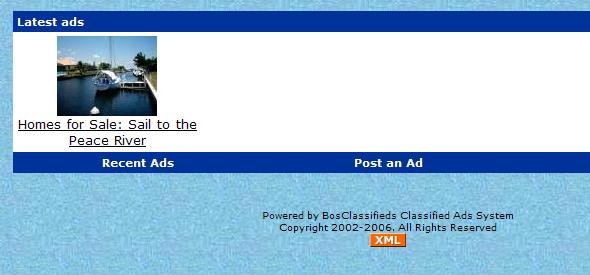
Now, click on the button at the bottom of the page.
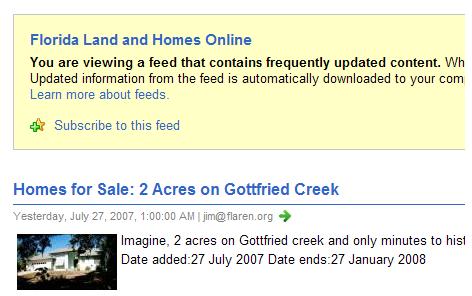
Your browser should open up to a page that looks similar to this.
You'll want to click on "Subscribe to this feed"
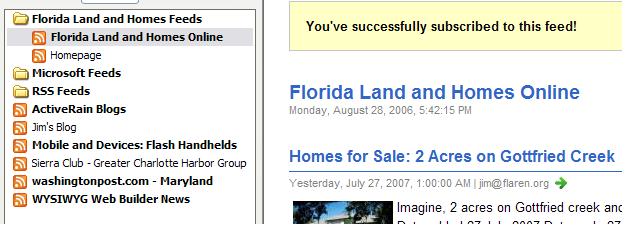
You can create a folder by right clicking in the favorites window. Here, we created a folder called "Land and Homes Online America" and the feed with the same name was entered. You can also right click on that and rename it "Englewood Properties" or anything else you like. This is advantageous if you subscribe to multiple feeds. To view the listing, just click on the individual article links.
Now, to get the latest properties updated daily, all you have to do is click on the Feed and you'll get the latest listings.
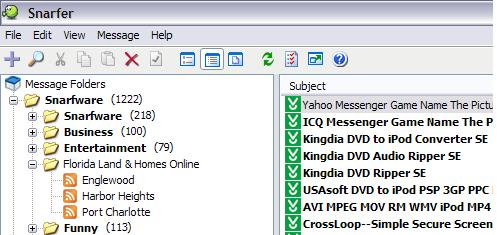
Screen shot of Snarfer
Feeds are stored in a favorites style list on the left.
The title of individual articles are on the top right and the actual article is viewed in the window below.
News feeds are an easy, convenient way to keep abreast of news stories or, in FLAREN's case, real estate news without having to visit the site daily. Just subscribe to the feeds you want to read and they're automatically delivered to you. Just look for the or icons on any web site. These are sites that supply updated feeds. Enjoy exploring!